
Download K-Meleon – fast browser, lightweight browser, efficient browsing, modern browser alternative, minimalist browser, web browsing tool
Overview
K-Meleon is a lightweight, high-performance web browser designed for users seeking speed and efficiency in their daily browsing. Built with a focus on minimalism and performance, it delivers fast rendering and responsive page loading, making it a compelling alternative to mainstream browsers like Firefox and Internet Explorer. The app is particularly suited for users who value speed over extensive customization and prefer a streamlined browsing experience without unnecessary overhead. Its core purpose is to provide a reliable, low-resource solution for accessing the web quickly, especially on older or less powerful hardware.
The target audience includes power users, developers, and individuals who prioritize browsing efficiency and system performance. While the browser does not emphasize visual polish or extensive add-on ecosystems, it offers a clean interface and straightforward functionality. The developer, K-Meleon Project, has maintained the app since its initial release in 2010, suggesting a stable, long-term commitment to a niche but dedicated user base. Although the project’s update frequency is limited, the browser continues to serve its intended purpose effectively.
Real-world use cases include quick research, lightweight web access on low-end machines, and environments where system resources are constrained. In the broader app ecosystem, K-Meleon occupies a unique space as a minimalist, high-speed browser that challenges the notion that modern browsing must come with heavy resource demands. Its continued existence reflects a demand for efficient, no-frills digital tools in an age of bloated software.
Key Features & Functionality
- Fast Page Rendering: K-Meleon leverages optimized code to deliver rapid page loading, even on complex or poorly structured websites. This makes it ideal for users who need immediate access to information without waiting for content to load.
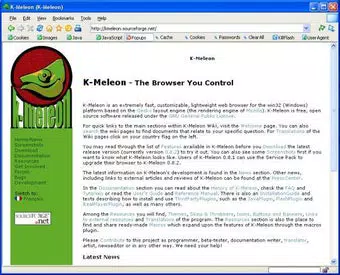
- Minimalist Interface: The browser’s layout is clean and uncluttered, minimizing distractions and allowing users to focus on content. The design is reminiscent of Firefox, offering familiar navigation elements for users transitioning from mainstream browsers.
- Customization via Themes and Skins: Users can personalize the browser’s appearance with various themes and skins, enabling a tailored visual experience without compromising performance.
- Plug-in Support: K-Meleon supports a range of plug-ins that can be installed with minimal effort. While the selection is not as extensive as in larger ecosystems, it includes essential tools for common web tasks.
- Unique Terminology: The browser uses alternative terms—such as "Layers" instead of "Tabs"—which may initially confuse new users. However, this design choice reflects a deliberate effort to differentiate the interface and may appeal to users seeking a distinct browsing paradigm.
For example, a user working on a legacy system might use K-Meleon to access online documentation without experiencing lag. Similarly, a developer testing lightweight web components could benefit from the browser’s minimal resource footprint. The combination of speed, simplicity, and low memory usage makes it a practical tool for specific workflows where efficiency is paramount.
Interface, UX & Performance
The user interface of K-Meleon is designed with simplicity and speed in mind. It features a clean layout with intuitive placement of core navigation elements, including address bars, back/forward buttons, and a menu system. The visual style is functional rather than flashy, aligning with its minimalist philosophy. Users familiar with Firefox will find the navigation flow familiar, reducing the learning curve for experienced users.
Navigation is straightforward, with minimal steps required to perform common tasks like opening new pages, managing Layers (equivalent to tabs), and adjusting settings. The browser responds quickly to user input, maintaining responsiveness even under moderate load. Although the developer did not list formal performance metrics, the app’s small file size of 3.6 MB suggests an emphasis on efficiency and low resource consumption.
Performance on different device categories is likely to be consistent, particularly on systems with limited processing power or memory. The browser’s lightweight nature makes it suitable for older hardware or environments where system stability is critical. Stability is maintained through a focused feature set, though users should be aware that infrequent updates may affect compatibility with newer web standards over time.
Platform Compatibility & Technical Requirements
K-Meleon is available exclusively for the Windows platform. It is designed to run on Windows operating systems, though specific OS version requirements were not listed. The app has a file size of 3.6 MB, making it highly portable and suitable for storage on flash drives or low-capacity devices. The version currently available is 2.5.12, released on March 5, 2010.
The developer did not specify minimum OS requirements, so users should exercise caution when installing on newer Windows versions. Compatibility with modern Windows builds (e.g., Windows 11) may vary, and performance could be affected by system updates or security patches. The lack of detailed technical specifications means users should test the app in their environment before relying on it for critical tasks.
Pros and Cons
Pros
- Extremely lightweight with a small file size of 3.6 MB
- Fast page rendering and responsive performance
- Minimalist interface ideal for speed-focused users
- Supports themes and skins for visual customization
- Free to download and use without licensing restrictions
Cons
- Infrequent updates may impact long-term compatibility
- Unique terminology (e.g., "Layers" instead of "Tabs") may confuse new users
- Limited plug-in ecosystem compared to mainstream browsers
- Developer did not provide detailed system requirements
- Not available on mobile platforms like Android or iOS
FAQ
Is K-Meleon safe to download and use?
Yes, K-Meleon is free and open to download. However, due to its infrequent updates, users should ensure their system is protected with up-to-date antivirus software and avoid visiting untrusted websites.
Can I use K-Meleon on Windows 10 or Windows 11?
While K-Meleon was released in 2010, it may run on newer Windows versions. However, compatibility is not guaranteed, and users should test the app in their environment before relying on it for daily use.
Is K-Meleon available for Android or iOS?
No, K-Meleon is currently only available for Windows. There are no official versions for Android or iOS devices.
How often does K-Meleon receive updates?
The update frequency is low. The last version released was in 2010, and the developer has not announced a regular release schedule. Users should expect limited improvements or security patches over time.
Can I install additional plugins or extensions?
Yes, K-Meleon supports plug-ins, though the selection is more limited compared to browsers like Firefox or Chrome. Installation is straightforward, but users should verify plugin compatibility with the current version.
Final Thoughts
K-Meleon remains a noteworthy option for users seeking a fast, lightweight browser that prioritizes efficiency over features. Its minimalist design, rapid rendering, and low resource usage make it a valuable tool for specific use cases—especially on older or resource-constrained systems. While its outdated update cycle and unique terminology may deter casual users, it offers a refreshing alternative for those who value speed and simplicity.
For developers, testers, or individuals working in low-resource environments, K-Meleon delivers real utility without the overhead of modern browsers. Its free availability and small footprint further enhance its appeal. Despite its age, it continues to serve a niche but important role in the browsing landscape.
Download K-Meleon now


